Key takeaways
- Set your template, font and section order once and every new resume follows them.
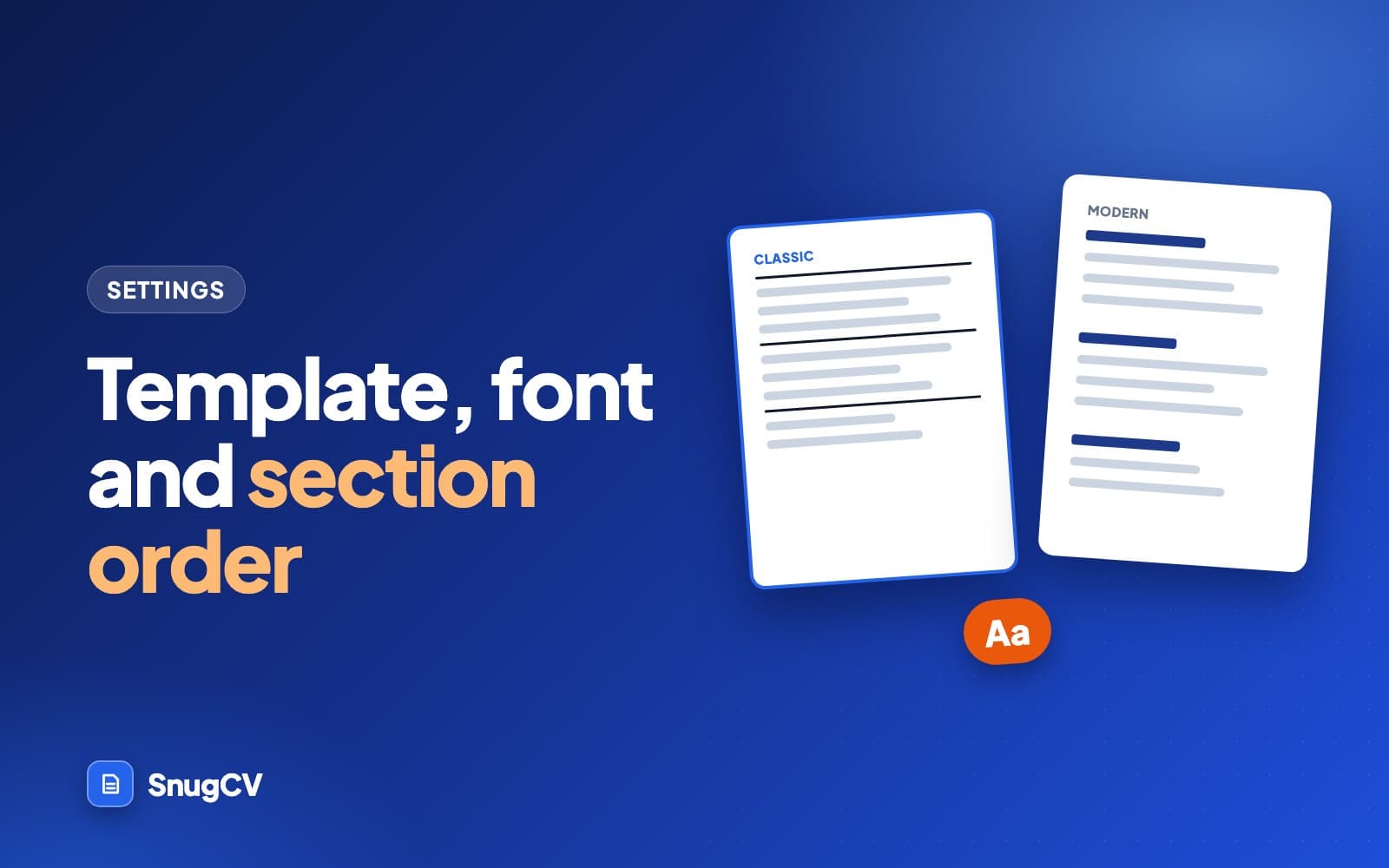
- Classic is a compact single column. Modern has bolder headings and more white space.
- Settings apply to new documents. Existing ones are not changed, and a document keeps the section order it was made with.
- Put the section a reader needs first at the top, pick the font that reads best to a person, and open the downloaded PDF once to check it.
In this guide
Most of what makes a resume look the way it does is decided once, in Settings, and applied to every document after. Spend five minutes there before you tailor your first resume and you will not think about layout again.
This guide goes through each option, what it does to the page, and how to choose for your field and your stage of career. Presentation has two halves. Resume formats covers the order of the content, such as chronological or combination. This guide covers how that content is drawn on the page.
Open the settings
Choose Settings in the sidebar and find Resume preferences. These apply when you generate a new resume or cover letter. Documents you have already made are not changed.
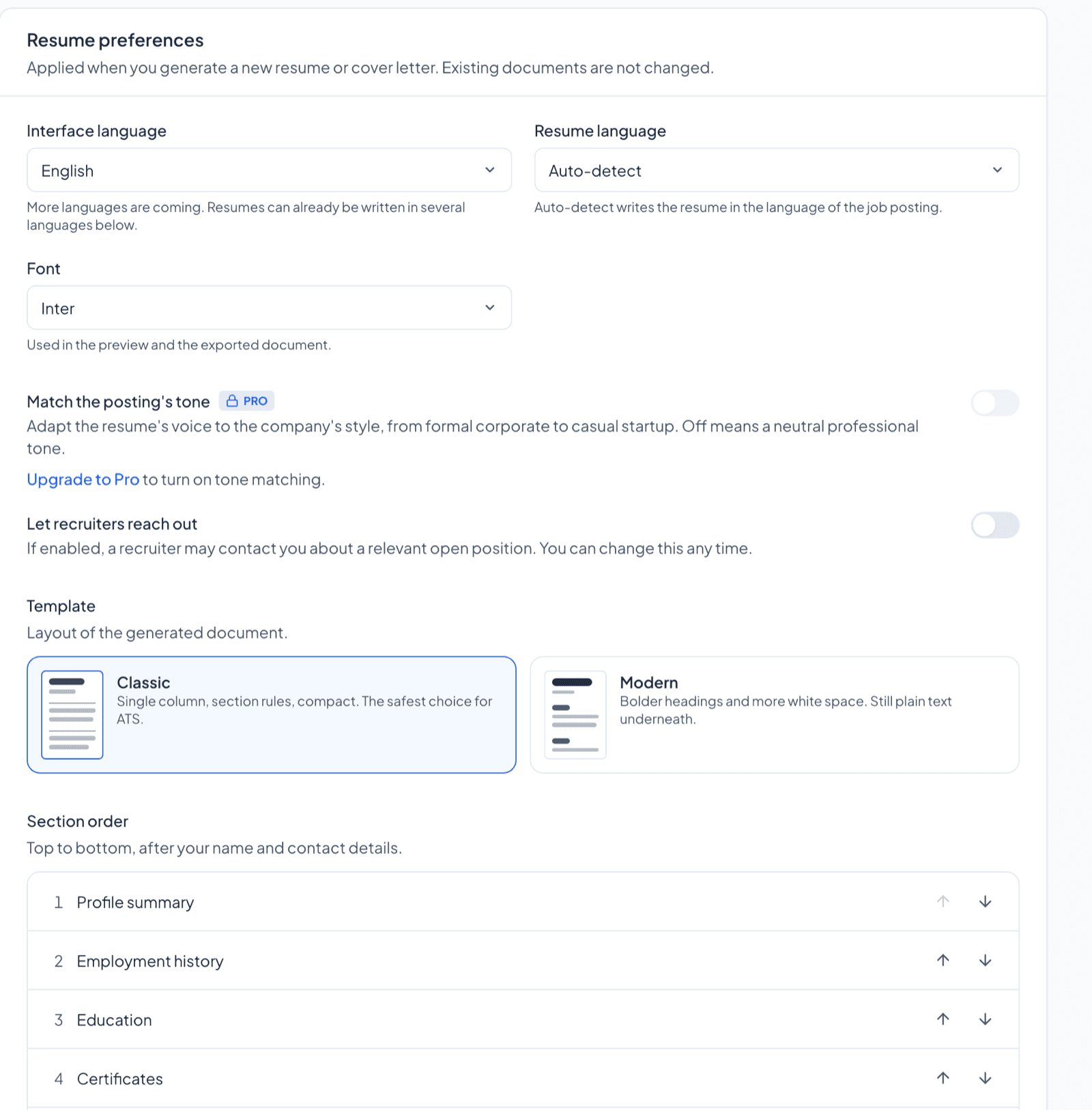
The card holds interface language, resume language, font, tone matching, the recruiters opt-in, template and section order. A new account starts with Inter, the Classic template and the sections in the order shown in the screenshot. Four of the choices shape the document, and they behave differently once it exists.
| Choice | Set in | Changeable on a finished document? |
|---|---|---|
| Template | Settings, Resume preferences | Yes, from the edit screen |
| Font | Settings, Resume preferences | Yes, from the edit screen |
| Section order | Settings, Resume preferences | No. It is fixed when the document is made |
| Resume language | Settings, Resume preferences | No. Generate a new document |
Template
There are two templates:
- Classic is a single column with section rules and a compact layout. It is the safe choice for applications that go through online forms.
- Modern has bolder headings and more white space. It is still plain text underneath, so it is not a graphic layout.
Pick the one that reads better to you. You can still change the template of any single document from its edit screen. See how to edit your resume and download it as a PDF. Templates apply to resumes. A cover letter PDF has its own plain letter layout, and it uses the font you chose.
Here is what actually differs on the page.
| Element | Classic | Modern |
|---|---|---|
| Your name | Medium size | Larger |
| Rule under the header | Thin and dark | Thick and blue |
| Section titles | Small capital letters with a thin rule under each | Larger, written as normal words, in blue |
| Space between sections | Tighter | More open |
| Content and order | The same | The same |
Neither template uses tables, text boxes, icons or images. Both are a single column of text with dates at the right edge of each job line, and both show your links as underlined text in the header. SnugCV describes Classic in Settings as the safest choice for applicant tracking systems. If you want to know what those systems do with a file, what is an applicant tracking system explains it without hype.
Compact and plain
Choose Classic when
- You apply through online forms and upload portals
- Your field is conservative: law, finance, accounting, government, education, healthcare administration
- You have a lot to fit and want the tighter spacing
- You are not sure, and want the choice you can defend in any setting
Open and a little brighter
Choose Modern when
- Your resume is short and the extra white space helps it breathe
- The employer is a small business, a startup, a studio or a shop that values a friendly look
- You want the header to stand out when a person reads it on screen
- You print it, and have checked that the blue still reads in black and white
There is no wrong answer here, because the facts on the page are identical. If you cannot decide, set Classic, tailor, and look at the same document in Modern from the edit screen. Switching a finished document costs nothing.
Font
The font options are Inter, Arial and Times New Roman. The font you choose is used in the preview and in the exported PDF.
Arial
Maya Torres, operations coordinator
Scheduled 40 weekly deliveries and kept the shared calendar current for a six-person team.
Times New Roman
Maya Torres, operations coordinator
Scheduled 40 weekly deliveries and kept the shared calendar current for a six-person team.
Inter, the default, is a sans-serif designed for reading on screens, with open, clear letters. It is not shown above because it depends on the font being installed on your machine, but the PDF embeds it, so it looks the same everywhere.
Here are sensible starting points. They are habits in each field, not rules, and a clear layout matters more than the choice itself.
| Situation | A reasonable pick | Why |
|---|---|---|
| Online forms and upload portals in most fields | Arial or Inter | A plain sans-serif is clean at small sizes |
| Law, finance, accounting, government, academia | Times New Roman | The serif is familiar there and reads as formal |
| Healthcare, retail, hospitality, trades, logistics | Arial or Inter | Quick to scan, which suits a reader with a stack of resumes |
| Creative, startup or small-business roles | Inter with Modern | A more current look without decoration |
| A paper copy handed over at an interview | Times New Roman or Arial | Both hold up well in print |
The preview is a guide, and the PDF is the final word. The PDF embeds its own copy of each font so it looks the same on every machine. For Arial and Times New Roman it uses Liberation Sans and Liberation Serif, which have the same letter widths as the originals, so a line breaks in the same place. If the font name in the file properties looks different from what you chose, that is why. Best font for a resume goes into type, size and spacing in more depth.
Section order
Below the template choice is Section order, a list of your sections from top to bottom after your name and contact details: Profile summary, Employment history, Education, Certificates, Skills and Languages. Use the arrows to move a section up or down.
A common reason to change this: if you are a recent graduate, move Education above Employment history. If you have been working for years and your degree is not what the role cares about, leave Education lower.
- 1
Profile summary
Shown on the page as Summary.
- 2
Employment history
Shown on the page as Experience.
- 3
Education
Degrees, schools and years.
- 4
Certificates
Licenses and certifications you list.
- 5
Skills
A single list, most relevant first.
- 6
Languages
Each with the level you typed.
Three things to know about how the order is applied.
- Your name and contact details always come first, above every section.
- A section with nothing in it is left out, so there is no empty Certificates heading if you have none.
- The order is stored with each document when it is generated. Changing it later affects new documents only.
How to decide
The test is simple: what is the first question this reader has about you? Put the section that answers it at the top.
| Your situation | An order to try | Reason |
|---|---|---|
| Years in the same field | Summary, Employment, Education, Certificates, Skills, Languages (the default) | The recent jobs answer the question |
| Recent graduate or student | Summary, Education, Employment, Skills, Certificates, Languages | School work and projects carry more weight than a short job history |
| A role that requires a license (nursing, electrical, driving, teaching) | Summary, Certificates, Employment, Education, Skills, Languages | The reader checks the license first |
| Changing fields | Summary, Skills, Employment, Education, Certificates, Languages | Skills read before job titles from another field, with the jobs still shown |
| A job about language, such as interpreting or bilingual support | Summary, Languages, Employment, Education, Skills, Certificates | The language line is the qualification |
Three set-ups side by side
These are made-up people and one reasonable set-up for each. They are not recommendations for everyone in the same field.
| Person | Template and font | Section order | Why |
|---|---|---|---|
| Amara, a newly qualified nurse | Classic, Arial | Summary, Certificates, Education, Employment, Skills, Languages | Her license is what the reader checks first |
| Luis, a warehouse supervisor with long service | Classic, Arial | Summary, Employment, Certificates, Skills, Education, Languages | Forklift and safety certificates sit above the school entry |
| Dana, a restaurant manager moving into hotel sales | Modern, Inter | Summary, Skills, Employment, Education, Certificates, Languages | Sales and client skills read before the job titles |
What the PDF page does
The settings above feed into one PDF. These details help when you are deciding whether a resume needs trimming.
- The page is US Letter paper. Most applications are read on a screen, where the paper size makes no difference. If you will print on A4, check the print preview.
- Each job entry is kept in one piece. If a job does not fit at the bottom of a page, it moves to the next page whole.
- There is no font size or margin setting. The page is laid out for you, so the way to shorten a resume is to shorten the text in the edit screen.
- The file is named from your name, the word Resume and the company, such as Maya-Torres-Resume-Lakeside-Medical-Group.pdf.
A quick check: open the downloaded PDF, select all, copy, and paste into a plain text editor. If your resume appears in reading order, with the same words you saw on screen, the text in the file is real text that software can read. How to check your resume for ATS problems shows more checks like this one.
Language
The Resume language setting is set to auto-detect by default, which writes the resume in the language of the job posting. You can also choose a language. That is covered in how to make a resume in Spanish, German, French, Polish or Serbian.
The section headings on the page, such as Summary and Experience, are part of the layout and appear in English whatever language the resume is written in.
Match the posting's tone
Match the posting's tone adapts the resume's voice to the company's style, from formal corporate to casual startup. It is a Pro setting and it is off by default, which gives a neutral professional tone.

Tone matching changes wording only. Employers, titles, dates and education stay as they are in your profile, and every change still gets a plain-language note. It earns its place if your postings differ sharply in voice, such as a bank one day and a design studio the next. If you want one steady voice across every application, leave it off.
Let recruiters reach out
Let recruiters reach out is an opt-in. If you turn it on, a recruiter may contact you about a relevant open position. You can change it at any time. It sits on the same card as the layout settings, but it has no effect on how your resume looks.
Save your preferences
Choose Save preferences at the bottom of the card. If you change your mind before saving, Reset puts the options back as they were. After you save, a message confirms that the preferences apply to your next document.
When something looks off
| What you see | Why | What to do |
|---|---|---|
| A new resume ignores the order I set | The order was not saved before the document was made | Choose Save preferences, then tailor again |
| Old resumes did not change when I saved | Settings apply to new documents only | Change the font or template from each document's edit screen |
| A section is missing from the page | It is empty in your profile or in the document | Add the content in your profile, then tailor again |
| The font in the PDF looks different from the preview | The preview approximates the PDF, which embeds its own fonts | Trust the PDF, and open it once before you send it |
| A few lines spill onto a second page | There is no size setting to shrink the text | Trim a bullet or a skill in the edit screen |
| Section headings are in English on a resume in another language | The headings are fixed in the layout | Expect English headings above text in your language |
Mistakes that cost interviews
Do
- Decide the section order before the run that matters, because it is fixed when the document is made
- Open the downloaded PDF once, since it is the version the employer sees
- Match the font to the field you are applying in
- Keep the strongest section where the reader's eye lands first
- Trim text to fit a page instead of hunting for a smaller type size
Avoid
- Move Skills above your jobs and then list skills you cannot back up below
- Pick Modern for its look and skip the check that the blue prints well
- Change settings between two versions of the same application and lose track of which went where
- Expect a saved setting to rewrite an old document
- Treat the template as the thing that gets an interview
Next step
With your settings saved, tailor your next resume. Once you have a result, how to read your tailored resume explains the keywords, gaps and change notes, and how long should a resume be helps when the page runs over.
Questions people ask
Do settings change resumes I already made?
No. Your preferences apply when you generate a new resume or cover letter. Existing documents are not changed, though you can change the font and template of one document from its edit screen. Section order and language are fixed when the document is made, so changing them means generating a new one.
Which template should I pick?
Classic is a compact single column and the safer default if you apply through online forms. Modern has bolder headings and more white space and is still plain text underneath. Both show the same sections and the same words, so choose the one that reads better to you and to the people in your field.
What does Match the posting's tone do?
It adapts the voice of your resume to the company's style, from formal corporate to casual startup. It is a Pro setting and off by default, which gives a neutral professional tone. It changes wording only, so employers, titles, dates and education stay as they are in your profile.
What is the recruiters setting?
Let recruiters reach out is an opt-in. If you turn it on, a recruiter may contact you about a relevant open position. It has no effect on how your resume looks, and you can change it at any time from the same Settings card.
Can I change the section order of a resume I already made?
Not from the edit screen. A document keeps the section order that was in Settings when it was made. Change the order in Settings and tailor the posting again, which uses a credit on the free plan. Inside the Experience section, you can reorder roles from the edit screen.
Does the template change what is in the resume?
No. Classic and Modern show the same sections in the same order with the same text. They differ in the size of your name, the rule under the header, the section titles and the spacing. The cover letter PDF uses its own plain letter layout whichever template you pick.
Which font is best?
There is no single best one. Inter and Arial are plain sans-serif faces, and Times New Roman is a serif that many conservative fields are used to. In the PDF all three are plain text, so choose the one that reads most easily to a person, and open the downloaded file once to confirm it looks right.
Was this guide helpful?
Get the free resume checklist and new guides
Twenty checks to run before you send a resume, as a one-page PDF. After that, a short email when new guides go up, at most once a week.